Go Guardian

Displaying Go Guardian - -Go Gura...

-Go Guardian is an app the district is using for administration and teachers to monitor student activity during asynchronous time.

-Mrs. Mills, Mrs. D’Ercole, and teachers are monitoring student activity when they are logged-in using their CCSD Google username and password.

-If a student’s activity is flagged, administration will call home to discuss next steps.

Thank you for your understanding. It is our top priority right now to keep students safe during distance leaning education!

Great First Week!

I think we had a great first week in 5th grade.  Thank you so much for all that you did to prepare your students for their first week of school.  I know that we ask a lot of you in these first weeks, and I appreciate all that you do to make this process as smooth as possible.

A Great First Week | Mrs. Eberly's Class Blog

We did a lot of community building last week.  This week we will start working in more focused manner on our 5th grade curriculum.  Your students will likely find the work more demanding, but should find a comfortable groove as they find and turn in assignments, locate materials electronically, and flow to and from classes and subjects.

Your students have already created a great 5th grade distance learning community.  They must get that from great parents!  Thank you again for your continued support as we take on the unfamiliar. I love the growth mindsets we’ve all taken toward this process!

Here is the My Digital Planner of our week’s upcoming activities and assignments: 
https://bit.ly/2ED7bfO


Would you like to know if your child has any missing assignments? 
1. You can check Infinite Campus 
2. You can check your child’s Google Classroom page 
Tutorial: https://classroom.google.com/c/MTI1ODU2MjY3Mzgw/m/MTMxOTk3ODM4OTUw/details

A few helpful tips: 

  • It is recommended your child have 3 notebooks (Math, Reading, Writing)
  • Please help your child be on-time to the 4 live sessions each day
  • Live Sessions:  
    • 9:50am- Math 
    • 11:10am- S.S. (Live Sessions are Monday and Tuesday this week / Wednesday, Thursday, and Friday are recorded lessons)
    • 12:40pm- Reading 
    • 2:10- Writing 
  • The Google Meets chat box is for responding to the teacher, asking a question, or informing the teacher of an emergency/need. The Google Meets chat box is not for texting or talking with friends during a live session. 
  • Please find a quiet work space for live sessions. 
  • Google Meet links for Specials are found in Canvas on the teacher’s homepage button.

Here’s to another great week!

8/24/2020 Announcements

Displaying 8/24/2020 Announcements

Thank you for a wonderful kick-off to the start of the school year! Thank you for sharing your amazing children with me! We spent the day learning procedures, finding their Stuckey Teachers in a ‘Where’s Waldo’, creating a ‘get to know you’ bag, and practicing a Growth Mindset!

Tomorrow’s LIVE times with Mrs. Boelter are:
9:50am, 11:10am, 12:40pm, 2:10pm

Morning Announcements are posted on the Stuckey Website! https://stuckeyelementary.wixsite.com/stuckeyes/

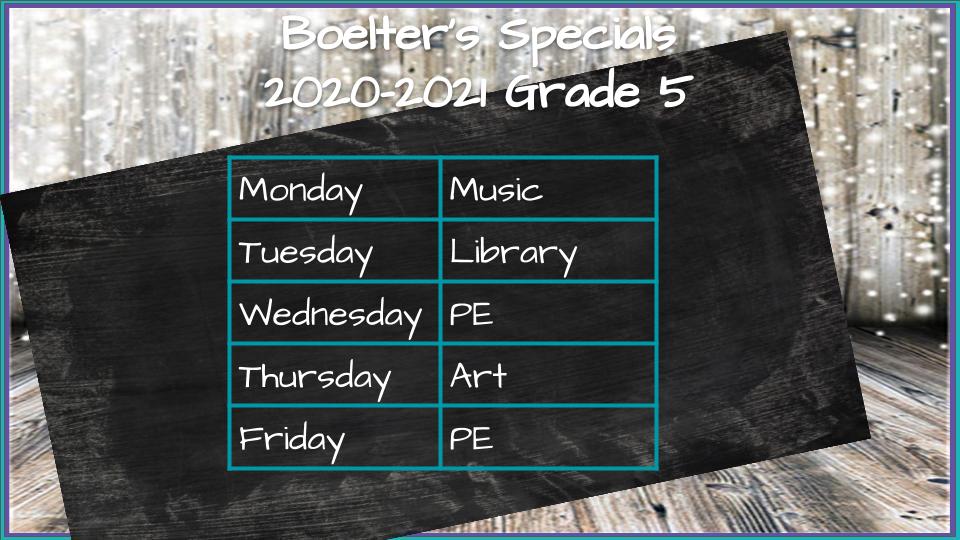
Specials will be posted in your child’s Canvas Dashboard. Specials is at 9:10am
(Clever CCSD Login – Canvas – Dashboard – Click the special of the day) https://msbinclass.com/wp-content/uploads/2020/08/specials-schedule-2.jpg

Daily assignments are color coded and placed in GOOGLE CLASSROOM! Due dates are listed in the directions!

Please remember that everything visible in your student’s camera is posted into each student in our classroom. Before having your student log in, make sure that everything in view of the camera is school appropriate. Additionally, if you need to help your student, make sure that you are wearing school appropriate clothing. I know we’re all in our own homes and comfortable, but we need to make sure that we’re mindful of what we’re broadcasting.

Thank you parents for all of your help today. I promise all of our procedures will become routine quickly! Students are much quicker studies than we are! Have a wonderful night!

Tomorrow is the Big Day

Dear Parents,
The first day of school is quickly approaching – tomorrow!. I hope you and your child are excited!

I have attached our ‘My Digital Planner’ so you can view the assignments for the week.
https://bit.ly/31kKaH9

I’ve also attached the Remote Learning Schedule so you can see Live Session times and Specials.
https://bit.ly/2EcHcfg

I will have a short Google Meet trial run this evening at 5:00pm for your child. This is completely optional! If your child goes to Google Classroom, then their calendar (in the Google ‘waffle’), they will see the link.
https://meet.google.com/cnf-bhie-mro?authuser=0

Here is a document to help remember each step for Monday morning to get ready for the day.
https://bit.ly/3hspmDe

If you need help getting your child into their Google account, please email/Remind App me, so I can help.
Please reach out to me if you have any questions or concerns. Enjoy the rest of your weekend!
Ms. Boelter

Let’s Get Ready For Monday!

Dear Parents,

Here is the link to the recording of our Meet and Greet recorded message from today https://www.loom.com/share/5e992c22401f4449864b90f58f409a50. Thank you to those of you who were able to attend. Please know I understand if you were not.

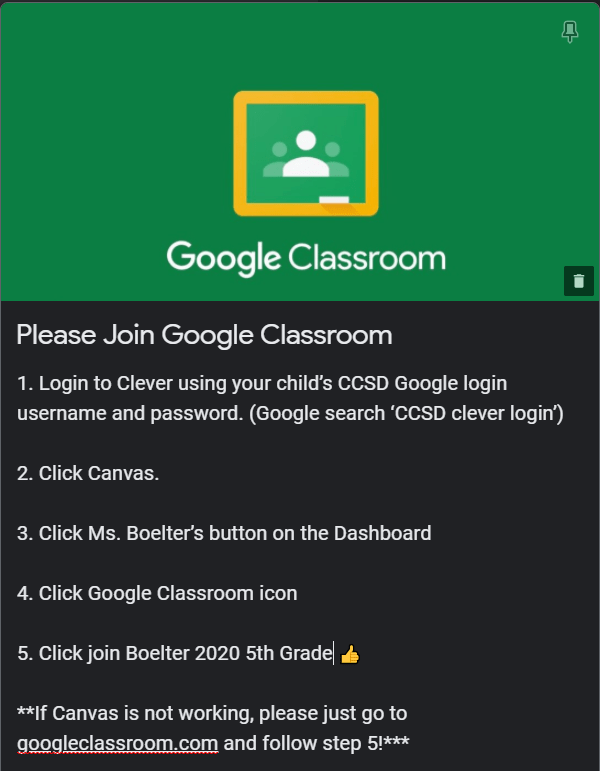
Please have your child login through Clever on Monday to get to Canvas. Here is the link for Clever (https://bit.ly/34o60LY). If for some reason you are unable to get into Canvas, please just log straight into Google Classroom.

You will be able to find the link for Morning Announcements on the Stuckey Website (https://stuckeyelementary.wixsite.com/stuckeyes/) Morning announcements are at 8:55.

After morning announcements, students log into Canvas for specials at 9:10. If Canvas is down, the link will be in Google Classroom. After specials, you will return to Google Classroom to log into our class Google Meets. The link for our Google Meet will be in the banner of our classroom.

Tomorrow, Saturday, August 22nd, staff will be passing out supply bags to those who were unable to pick them up before. Pass out will be from 9:00 am to 11:00 am.

If you have not joined your teacher’s Remind, please do so as soon as possible. Most information will be sent through Remind, and we don’t want you to miss anything.

Have a great weekend!

Mrs. Tabeek, Mrs. Bartlett, Mrs. Lyman, and Ms. Boelter

Welcome 5th Graders!

Dear Stuckey Families: 

Welcome to 5th grade! The 2020 – 2021 school year will begin on August 24th. You will receive a schedule in the next week that will explain synchronous (live instruction) and asynchronous (independent work) learning. A weekly digital planner for student learning will be posted in Canvas and Google Classroom each week. 

5th Grade / Welcome

Attendance will be taken daily. Your child will be marked present if they meet any of the following criteria: 

  • logging into the live session with their homeroom teacher
  • communicating with their homeroom teacher at any point during the day
  • complete assigned work

*Your child’s academic goal should be to participate in live lessons and follow their 5th grade schedule, everyday of distance learning. This will ensure students keep current and meet fifth grade standards.

Please look for the following information coming to you in the USPS mail

  • Post card to student with message from their homeroom teacher
  • Remind App (communication tool) sign-up information
  • Clever/Canvas/Google Classroom navigation directions
  • Your students Google login. (Please have your child check their login to make sure it works. If it doesn’t, please follow the instructions for resetting the password. Passwords should be their birthday YEARMONTHDAY.)

This year our virtual Meet and Greet will include an Orientation with information regarding distance learning.  We will be hosting two sessions so students and families can choose a time that works best for them.  Each teacher will record one of the sessions.  A link for families to view the recording at a later time will be available if you cannot make one of the virtual sessions.  Teachers will send a link to parents for their virtual sessions next week.  

  • Session 1: 10:00 – 10:30
  • Session 2: 1:00 – 1:30

Families can choose the session that works best for them.  You will only need to attend one session, as the information will be the same.  Recorded messages from our Administration and Specialists will also be available!

Thank you, 

Mrs. Bartlett    Ms. Boelter    Mrs. Lyman     Mrs. Tabeek

All The Fun Stuff

Today I am creating our year’s end video. I can’t believe how much all of your students have grown! Which reminds me, if you have any pictures from school activities that you have not shared with me, I’d love to include them in the video. Please send them to me!

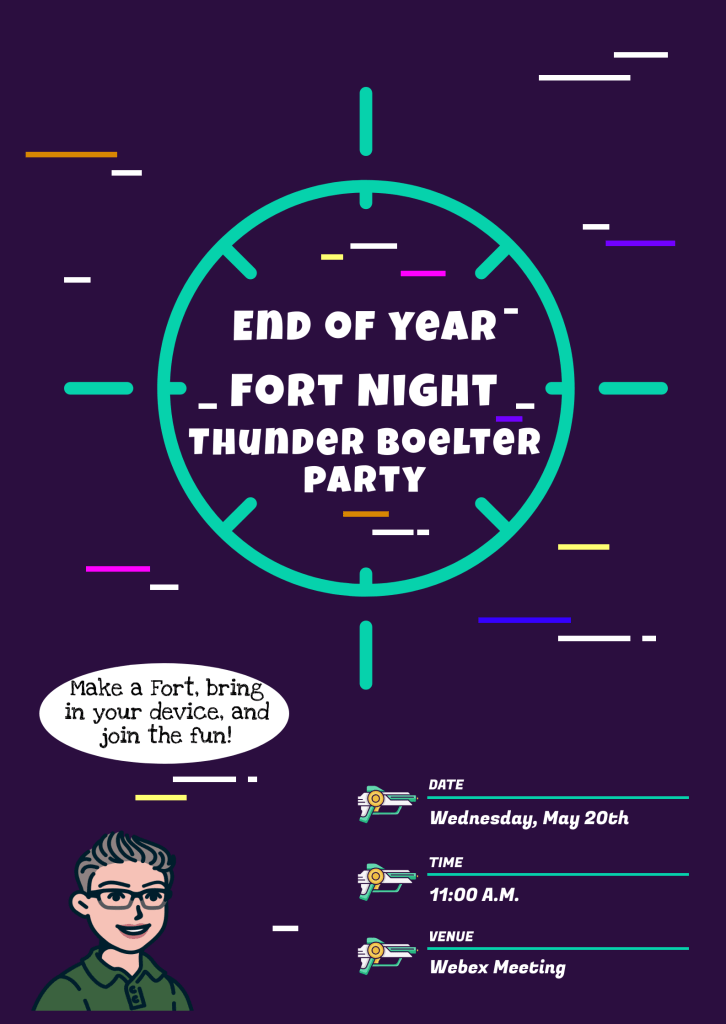
Tomorrow, we will have a live lesson at 2:00 p.m. Tuesday, we will have our end of year party lesson at 11:00 a.m. on Wednesday. We will have some fun during the lessons! Students will need a piece of paper and something to write with that they can share on camera with their friends.

Transparent Games Clipart - Play Games Clipart, HD Png Download ...

I have created end of year gift bags for each of the students as well, but I can’t deliver them yet. As soon as we get the okay from the district, I will drive around and drop them at your doors. If you are planning an extended vacation at the end of July or the beginning of June, please let me know so I don’t drop it while you’re gone.

Thank you for allowing me to learn with your student this year. We had a great year, even if it was cut short!

Last Week of School!

This is our last week of distance education and then your students will be 4th graders! I know this year isn’t ending as we would have liked, but I am as proud of this group as I have ever been of any. They persevered during a very difficult circumstances and made incredible growth.

This week, we will have one assignment. It would normally be a room breakout where the students complete it in groups. It will be available in Google Classroom first thing in the morning. They can complete it individually, with a friend virtually, or with a paper and pencil.

I am planning an end of year party at 11:00 where we play some games and a Kahoot on Wednesday of this week. Students will need to split their screens or use multiple devices to do this.